GEO, AEO and SEO for AI: Google’s new guidance explained

GEO, AEO and SEO for AI search visibility on Google

GEO and SEO for AI have become major topics for marketers, business owners, and agencies trying to understand how Google’s generative search features are changing organic visibility.

For months, marketers have been talking about GEO, AEO, llms.txt and “SEO for AI” as if search suddenly became a completely different game.

The conversation makes sense. AI Overviews, ChatGPT-style answers and generative search experiences have changed how people discover information. Instead of only looking at ten blue links, users now get summaries, recommendations and direct answers before they even click a result.

That naturally created anxiety.

Business owners want to know whether they need a new strategy. SEO teams want to know if traditional ranking signals still matter. Agencies want to understand whether AI search requires a separate playbook. And, predictably, a lot of people started selling complicated answers before the market had a clear question.

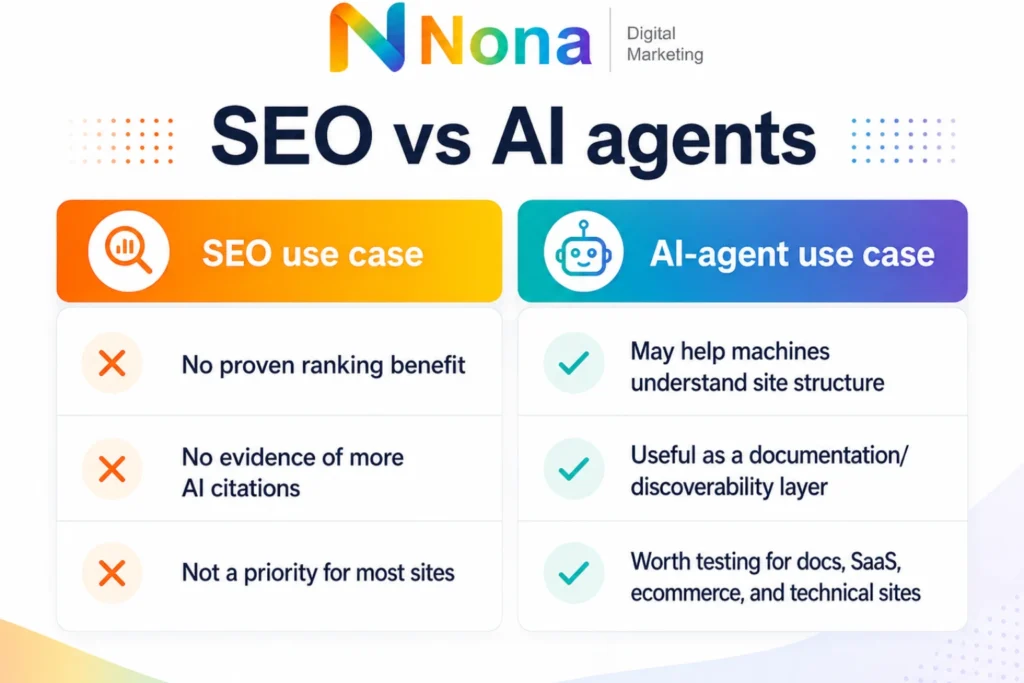
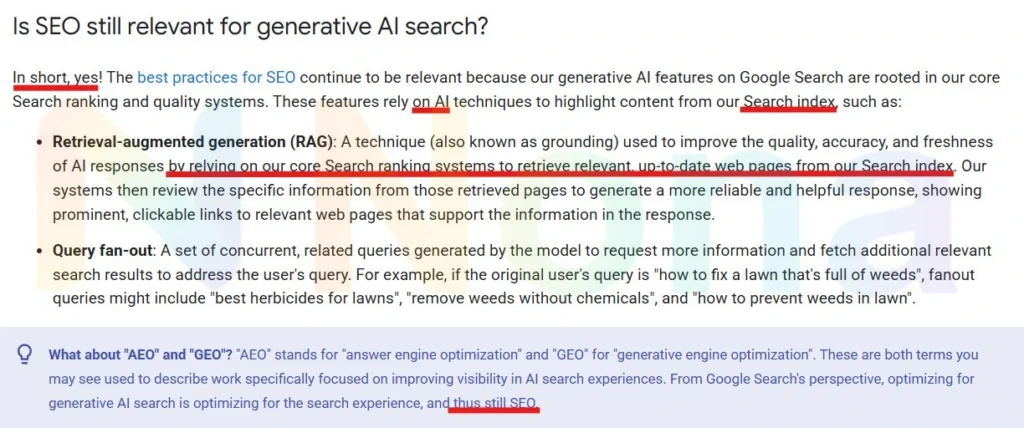
Google’s recent guidance makes one thing very clear: GEO and AEO are not replacing SEO. In its guide, Optimizing your website for generative AI features on Google Search, Google explains that SEO best practices still matter because generative AI features are rooted in Google’s core Search ranking and quality systems.

GEO and AEO are extensions of the same fundamentals that have always mattered: useful content, technical accessibility, clear structure, originality, and a real understanding of what the user is trying to solve.

There is no secret “AI-only index.” There is no magic file that guarantees visibility in AI answers. And there is no shortcut that turns weak content into a trusted source.

The brands most likely to benefit from AI search are the same brands that were already building useful, crawlable and credible content in the first place.

Table of Contents
  1. GEO and SEO for AI: What Google Really Wants
  2. Why Google Says GEO, AEO and SEO Are Not Separate Worlds
  3. Technical SEO for AI Search: What Actually Matters
  4. The Truth About llms.txt, Structured Data and “AI Optimization Hacks”
  5. How to Create Content That Can Rank in Google and Appear in AI Answers
  6. What Businesses Should Stop Doing in the Age of AI Search
  7. The Real SEO Opportunity Behind Google’s AI Updates
  8. SEO Is Not Dead, It Is Becoming More Demanding

GEO and SEO for AI: What Google Really Wants

The most important point is also the least exciting one: content still has to be useful.

That means the page needs to answer a real question, solve a real problem or help someone make a better decision. It cannot just repeat what already exists on every other website.

A lot of AI-focused SEO advice makes the topic sound more technical than it really is. People talk about chunks, prompts, files, markup and entity formatting. Some of that can matter in the right context, but none of it saves a page that does not deserve to be read.

Useful content usually has a few clear traits. It is specific. It explains the topic without hiding behind vague language. It gives examples. It shows judgment. It feels like it was written by someone who understands the subject, not by someone trying to fill a content calendar.

That matters even more in AI search.

Generative systems are designed to summarize information. If your content is generic, thin or interchangeable, there is very little reason for it to be selected, cited or used as a source. A page that says the same thing as a hundred other pages has no obvious advantage.

The opportunity is not to publish more average content. The opportunity is to publish content that is easier to trust.

Why google says GEO, AEO and SEO are not separate worlds

One of the biggest misconceptions right now is that AI search requires a completely separate strategy from traditional SEO.

It does not.

GEO, or Generative Engine Optimization, is simply a newer way of describing how content can be optimized for AI-driven discovery. AEO, or Answer Engine Optimization, focuses on making content clear enough to answer specific questions. Both are useful concepts, but they sit on top of SEO rather than replacing it.

Google’s AI Overviews still rely on the web. They still need pages that can be crawled, understood and evaluated. The system is not ignoring traditional search and building answers from a totally different universe.

That means the same foundations still matter:

SEO is still relevant for generative-ai-search
Helpful content, strong technical SEO, clear structure, and real user value still matter.

Google’s own documentation says that generative AI experiences in Search are still built on its core ranking and quality systems. So while terms like AEO and GEO are getting more attention, the fundamentals haven’t changed that much.

AI may change how answers are presented, but SEO is still what helps your content get discovered, understood, and trusted.

Your pages should be accessible to search engines. Your content should match search intent. Your information should be organized clearly. Your site should avoid unnecessary duplication. Technical foundations like a clear site structure and an well-structured XML sitemap still play an important role in helping search engines discover, understand, and prioritize your pages.

Your brand should demonstrate authority in its topic area. Your pages should be created for people first, not for a tool or a trend.

The language may have changed, but the discipline has not disappeared.

Good SEO already helps machines understand content. Good GEO simply pushes that idea further by making the content more direct, better structured and more useful in answer-based environments.

Technical SEO structure for generative AI search results

Technical SEO for AI search: What actually matters

Technical SEO is still part of the equation, but it needs to be understood correctly.

The goal is not to “trick” AI systems into reading your site. The goal is to remove friction so search engines can discover, crawl and interpret your content properly.

That starts with basics like indexability, clean internal linking, logical site architecture, fast-loading pages and mobile-friendly experiences. If important pages are blocked, buried or technically messy, they will struggle in regular search and AI search alike.

HTML structure also matters. Clear headings help define the page. Semantic formatting helps separate sections, lists, quotes and explanations. Descriptive titles and meta descriptions help clarify what the page is about. Internal links help search engines understand relationships between topics.

None of this is new, but it becomes more important when search experiences become more compressed.

In a traditional search result, a user might scan several pages before choosing one. In an AI-generated answer, the system may summarize several sources into one response. That means your content has to be easy to interpret before a human even lands on the page.

Clarity is not just good for readers. It is good for retrieval, summarization and trust. The best strategy is still built on the same foundations outlined in Google Search Essentials: helpful content, crawlable pages, clear structure, and a site experience that works for real users.

The truth about llms.txt, structured data and “ai optimization hacks”

A lot of the current noise around AI SEO comes from tools and tactics that are being sold as must-haves.

Some are useful. Some are speculative. Some are mostly distractions.

Take llms.txt, for example. The idea is interesting: a file that helps large language models understand which parts of a site are important. But it is not a confirmed ranking factor for Google Search, and it should not be treated like a silver bullet.

The same applies to over-optimized “AI chunks.” Breaking content into clear, readable sections is smart. Creating awkward blocks of text just because someone said AI prefers them is not.

Structured data is another good example. Schema markup can help search engines understand certain types of information, especially products, reviews, FAQs, events, organizations and articles. But structured data does not create quality. It only describes what already exists.

If the page is weak, schema will not make it strong.

The safest approach is simple: use technical enhancements where they genuinely support the user and the content. Do not build your strategy around tricks that may never matter.

How to create content that can rank in google and appear in AI answers

Content that performs well in this new environment usually comes down to three things:

  • It answers the main question clearly: A reader should not need to dig through six paragraphs before understanding the point of the page. Strong introductions matter because they set the context and show the user that they are in the right place.
  • It adds something original: That could be a point of view, practical experience, examples, comparisons, data, screenshots, expert commentary or a clearer explanation than competitors are offering.
  • It is organized for scanning: People do not read blog posts like books. They jump between sections, look for answers and decide quickly whether a page is worth their time. AI systems also benefit from structure because it makes the information easier to extract and summarize.

Strong headings also make the page easier to scan and understand. We covered this in more detail in our guide on how H2 and H3 headings help your content get cited by ChatGPT.

This is where SEO writing and good editorial writing overlap.

A strong page should have descriptive headings, concise sections, natural keyword usage and enough depth to satisfy the search intent. It should not feel stuffed, robotic or built around a single keyword repeated until the text becomes unreadable.

The best content usually sounds like a knowledgeable person explaining the topic clearly. This is also why SEO cannot be reduced to keyword stuffing. As we explain in SEO is never just about keywords, search visibility depends on relevance, authority, structure, and user intent.

The rise of AI search has made some bad habits worse.

Many companies are rushing to publish more content, faster. They are creating dozens of similar pages, rewriting existing posts with minor changes and chasing every new acronym in the industry.

That is not a strategy. It is noise.

Businesses should be careful with content that exists only because a keyword tool showed volume. They should avoid publishing pages that do not add anything new. They should stop assuming that more blog posts automatically mean more authority.

They should also be cautious with automation.

AI can be useful for research, outlines, editing and ideation. But when a site becomes a collection of generic AI-written articles with no experience, no examples and no real editorial judgment, it becomes harder to trust.

In a world where anyone can produce average content quickly, human expertise becomes more valuable, not less.

The real seo opportunity behind Google’s AI updates

The biggest opportunity is not to chase every new tactic. It is to become the clearest and most trusted source in your category.

That means building content around real customer questions, not just keywords. It means improving service pages so they explain what you actually do. It means creating comparison pages, educational guides, case studies and articles that help users move from confusion to confidence.

For agencies and SEO consulting and service businesses, this is especially important.

AI search may reduce some low-intent clicks, but it can also increase the value of strong brand mentions and authoritative content. When users see your business consistently connected to helpful answers, your brand becomes part of the decision-making process earlier.

That is why SEO services now need to think beyond rankings alone. Visibility still matters, but the definition of visibility is expanding. It includes organic rankings, AI summaries, brand mentions, topical authority, local presence and the quality of the content experience after the click.

Seo is not dead, it is becoming more demanding

Every major change in search creates the same reaction. People say SEO is dead. Then SEO changes, matures and becomes more strategic.

AI search is no different.

GEO and AEO are useful terms, but they do not erase the fundamentals. Google still needs accessible pages. Users still need helpful information. Brands still need trust. Content still needs to be worth reading.

The companies that win will not be the ones chasing every shortcut. They will be the ones building strong websites, publishing genuinely useful content, and making it easy for both people and search systems to understand why they deserve attention.

In other words, the future of SEO still looks a lot like good SEO. It is just less forgiving of weak content.

AI search is changing how people discover brands, compare services and make decisions online. But the answer is not to chase every new tactic or publish content without a clear strategy.

The real opportunity is to build a stronger SEO foundation: useful content, clean technical structure, topical authority and pages that are easy for both people and search engines to understand.

If your business wants to improve visibility on Google, prepare for AI-powered search results and turn organic traffic into real leads, our agency can help.

For businesses that want to adapt to this shift, our AI SEO services can help build a strategy focused on search visibility, content quality and long-term organic growth.

Contact Nona Digital Marketing today to improve your visibility on Google, prepare for AI-powered search, and turn organic traffic into real business opportunities.

SEO Services

Is your SEO ready for AI search?

Google’s guidance is changing how brands should think about visibility, content, and search intent. If you want to understand how GEO, AEO, and SEO for AI apply to your website, our team can help you build a smarter organic strategy.

Guilherme Luiz Ferreira, Founder of Nona Digital Marketing

Written by

Guilherme Luiz Ferreira

Founder of Nona Digital Marketing, helping Orlando service-based businesses grow through SEO, Local SEO, PPC, web design, analytics, and practical digital marketing strategies.

Sitemap.xml: What is it? Types, formats, and how to create one

An XML sitemap is a file that lists all the important pages on your website and tells search engines like Google where to find them. Without one, search engines have to discover your pages on their own by following links, which works fine for small sites, but gets unreliable fast as your site grows.

For larger sites with hundreds or thousands of pages, a well-structured sitemap means Google spends its crawl budget on the pages that actually matter, not wasting time on duplicates or low-value content.

In this guide we’ll cover what an XML sitemap is, the different types, the right format to use, best practices, and exactly how to create and submit one. XML sitemaps are also a key part of technical SEO, especially for larger websites where crawlability and indexation matter.

Table of Contents

Table of Contents

  1. What is an XML sitemap?
  2. Which websites need a sitemap?
  3. How to check if a website has an XML sitemap?
  4. What are the types of sitemaps?
  5. Why create an XML sitemap?
  6. What are the benefits of sitemap.xml for SEO?
  7. What information is included in a sitemap?
  8. How to create a sitemap?
  9. What to include in your sitemap.xml?
  10. Which pages should be included in sitemap.xml?
  11. Where should the Sitemap be placed?
  12. How to submit a sitemap.xml to Google?
  13. How do I update a sitemap.xml file?
  14. What are the sitemap best practices for SEO?
  15. What are the main problems related to sitemaps.xml?

What is an XML sitemap?

A sitemap.xml is a file that lists all the pages on your website in one place. Think of it as a map you hand directly to Google, instead of waiting for it to find your pages by following links, you’re telling it exactly where everything is.

There are two types: an XML sitemap for search engines, and an HTML sitemap for users. The XML version is the one that matters for SEO.

Which websites need a sitemap?

It is recommended that all websites have an XML sitemap to improve content indexing and discovery by search engines. Technically every website can benefit from a sitemap, but it becomes genuinely important in four situations.

  • Large and complex websites: if you have hundreds or thousands of pages, Google has a crawl budget and won’t necessarily find everything on its own. A sitemap tells it which pages to prioritise.
  • New websites: Google discovers pages by following links, and a brand new site has very few links pointing to it. A sitemap speeds up the initial indexing process considerably.
  • Websites with frequently updated content: if you’re publishing new pages regularly, a sitemap signals those changes to Google faster than waiting for it to recrawl.
  • Websites with hidden or hard-to-reach pages: if some pages are only accessible via JavaScript or have very few internal links pointing to them, they can get missed during a standard crawl. A sitemap acts as a safety net.

If your site is small, well-linked and rarely changes, a sitemap is still worth having, it just becomes less critical.

How to check if a website has an XML sitemap?

To check if a website has a sitemap, you can access the robots.txt file. The quickest way to check if a site has a sitemap is to go directly to the robots.txt file — just add /robots.txt to the end of any domain, like example.com/robots.txt. If there’s a sitemap, it’ll usually be referenced there with a line that starts with “Sitemap”.

You can also try going directly to these URLs, just swap out the domain for whichever site you’re checking:

  • example.com/sitemap.xml
  • example.com/sitemap.html
  • example.com/sitemap_index.xml

Some sites use sitemap_index.xml instead of sitemap.xml

Google has a limit of 50,000 URLs per sitemap file. For a small site that’s never an issue, but once you start dealing with thousands of pages it becomes a problem.

The solution is to split everything into multiple sitemap files, one for articles, one for products, one for state pages, and then create a single index file that points to all of them: That’s the sitemap_index.xml.

Think of it like a folder. The index file is the folder, and the individual sitemaps are the files inside it.
So if you see sitemap_index.xml, it just means the site is large enough to need more than one sitemap file.

What are the types of sitemaps?

There are two types of sitemaps, and they serve very different audiences:

XML Sitemaps

An XML sitemap is just a text file written in XML format. Inside it, you’ll find a list of URLs from your site, and for each one you can include a few extra details, when the page was last updated, how often it changes, and how important it is relative to other pages.

The main audience for this file is search engines. Google and Bing read it to understand what’s on your site and decide what to crawl. Your regular site visitors will never see it, it’s purely a communication tool between your site and search engines.

Sitemaps HTML

An HTML sitemap is the user-facing version, it’s an actual page on the site, usually linked in the footer, that lists out all the main sections and pages in a readable format.

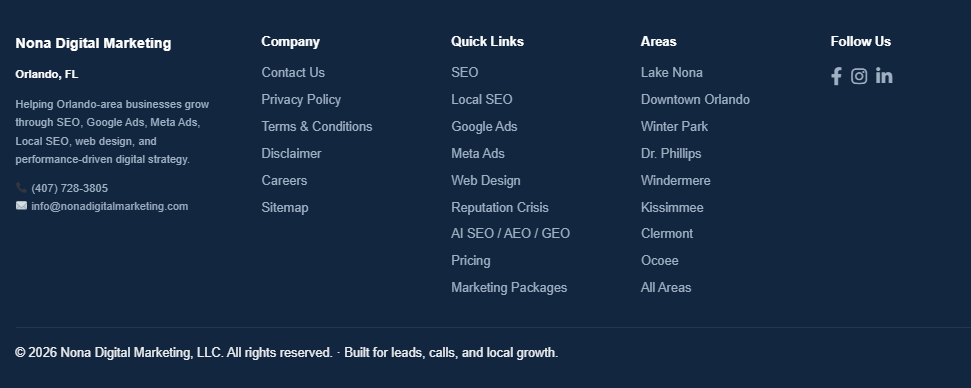
You can also check the site’s footer, some sites link to their sitemap there. Here’s an example from our own site:

sitemap.xml

As you can see in the example above, the Sitemap link sits in the footer under the Company column, exactly where users and search engines expect to find it.

Unlike the XML version which is just for search engines, this one is built for real people. If someone lands on your site and can’t find what they’re looking for, a well-structured HTML sitemap gives them a quick overview of everything available.

For an HTML sitemap, you don’t always need to add every single URL from the website. An HTML sitemap should include the important pages users may want to find, such as main service pages, category pages, key blog posts, contact/about pages, and other useful landing pages.

They’re less common than they used to be, but for large sites with complex navigation they’re still worth having. For SEO, the XML sitemap is usually where you include the URLs you want search engines to crawl and index. The HTML sitemap is more for users and site navigation.

Why create an XML sitemap?

So why does a sitemap actually matter? Here’s what it does for your site in practice.

Making sure your important pages actually get indexed

Search engines find pages by following links. If a page has few or no links pointing to it, there’s a good chance it never gets crawled. A sitemap fixes that; you are explicitly telling Google which pages exist and which ones matter, so nothing important gets missed

Help search engines understand the site’s structure and index the content better.

A sitemap doesn’t just list URLs, it also gives search engines a sense of how your content is structured. Which pages are most important, how sections relate to each other, and what gets updated regularly. That context helps Google index your content more accurately and show the right pages for the right searches

It shows your site is well maintained

A sitemap that’s kept up-to-date, with new pages added promptly and removed pages taken out, signals to Google that the site is actively managed. It’s a small thing, but it’s part of the overall picture of a healthy, trustworthy site.

What are the benefits of sitemap.xml for SEO?

Using a sitemap offers several benefits for an SEO strategy. Here are some of the key benefits:

BenefitExplanation
Efficient indexingAn XML sitemap helps search engines discover and index your website’s main pages, reducing the chance that important content is missed.
Faster discovery of updated contentWhen you add, update, remove, or redirect pages, your sitemap helps search engines identify those changes more efficiently.
Better understanding of site structureA sitemap gives search engines a clearer view of how your website is organized and how key pages are connected.
Prioritization of important pagesBy including only your most important, indexable URLs, you help search engines focus on the pages that matter most for SEO.
Easier error detectionA sitemap can help identify crawling or indexing issues when analyzed through tools like Google Search Console or SEO auditing platforms.
Integration with SEO toolsMany SEO tools use sitemap data to monitor indexing, crawlability, errors, and overall website performance.

What information is included in a sitemap?

A sitemap.xml file is made up of a few simple elements. Most of them are optional — the only one you actually need is the URL itself. The rest just give search engines extra context about each page.
Here’s what each element does:

<loc>

The element stands for “Location.” It indicates the specific URL of a page on the website. The URL of the page. This is the only required element, every URL in your sitemap needs on.

<lastmod>

The date the page was last updated. Search engines use this to decide whether they need to recrawl a page or if nothing has changed since their last visit

<changefreq>

How often the page is expected to change. You can set this to always, hourly, daily, weekly, monthly, yearly or never. Worth knowing, Google doesn’t follow this value strictly, it uses it as a rough guide at best.

<priority>

How important this page is relative to others on your site, on a scale from 0.0 to 1.0. A value of 1.0 means highest priority. One thing to be clear about, this doesn’t affect your ranking in search results, it just helps Google decide which pages to crawl first when it visits your site.

create-a-sitemap”>How to create a sitemap?

There are a few ways to create a sitemap depending on how your site is built:

Let your CMS do it automatically

Most content management systems can generate a sitemap for you. WordPress, Shopify, Wix and others either include this by default or have plugins that handle it. On WordPress, Yoast SEO and Rank Math are the most common options, install either one and the sitemap gets created and updated automatically every time you add or remove a page. This is the easiest approach for most sites.

Use an online sitemap generator

If your site is small and you don’t use a CMS, an online sitemap generator is the quickest option. You enter your URL, the tool crawls your site and spits out a sitemap file you can upload directly to your root directory. Screaming Frog, Sitebulb and XML-Sitemaps.com all do this well.

Create a sitemap manually

For very small sites with a handful of pages, you can write the XML file yourself in any text editor. It’s straightforward, you just list each URL with the relevant elements. That said, manual sitemaps become a maintenance headache fast. The moment you start adding pages regularly and forgetting to update the file, it starts working against you. For anything beyond a small static site, use one of the other two methods.

For sitemaps with dozens of URLs, generate a sitemap automatically

If your site has too many pages to manage manually, there are tools that will crawl your site and generate the sitemap for you. Here are some of the most commonly used ones:

  • Yoast SEO
  • Google XML Sitemaps
  • Screaming Frog
  • Online XML Sitemap Generator
  • XML-Sitemaps.com
  • Slickplan Sitemap Builder
  • Inspyder Sitemap Creator
  • Dyno Mapper
  • Sitebulb
  • JetOctopus
  • SE Ranking Sitemap Generator
  • Rank Math SEO
  • All in One SEO
  • A1 Sitemap Generator
  • WriteMaps
  • Octopus.do
  • FlowMapp
  • PowerMapper
  • VisualSitemaps
  • Sitechecker Sitemap Generator

These tools typically crawl your website, identify all pages, and generate a complete XML sitemap containing the necessary elements.

SEO Services

Need expert SEO consulting for your website?

Get expert SEO consulting to improve rankings, traffic, and long-term visibility.

What to include in your sitemap.xml?

As a rule, include any page you want Google to index. That typically means your homepage, product and service pages, category pages, blog posts, guides and contact pages. Policy pages like your privacy policy and terms of service are worth including too.

What to leave out

duplicate pages, paginated pages, pages with noindex tags, login pages and anything with thin or duplicate content. Including low-quality pages in your sitemap wastes crawl budget and can actually work against you.

Where to put it

The sitemap.xml file should sit in the root directory of your site, so example.com/sitemap.xml. That’s where search engines expect to find it.

Once it’s there, add a reference to it in your robots.txt file so search engines can find it immediately:

Sitemap: https://www.example.com/sitemap.xml

Simple line, but worth doing, it removes any guesswork about where your sitemap lives.

Which pages should be included in sitemap.xml?

All important pages on your website should be included in sitemap.xml. See some examples below:

  • Main pages: All of your website’s core pages, such as the homepage, product/service pages, category pages, blog pages, etc.;
  • Content pages: Include all relevant content pages, such as articles, blog posts, guides, tutorials, and other informational resources;
  • Product/Service pages: If your website features products or services, ensure that you include the detail pages for these products or services in the sitemap;
  • Contact pages: Contact pages, contact forms, or other important communication pages should be included to facilitate contact with site visitors;
  • Policy pages: Important policy pages, such as your privacy policy, terms of service, and return policies, should be present in the sitemap.

Where should the Sitemap be placed?

Your sitemap.xml should live at the root of your domain (example.com/sitemap.xml). That’s where search engines look for it by default.

Then add this line to your robots.txt file:

Sitemap: https://www.example.com/sitemap.xml

That way search engines find it immediately without having to guess.

How to submit a sitemap.xml to Google?

The simplest way is through Google Search Console:

Submit a Sitemap in Search Console

  • Access Google Search Console and sign in;
  • Select your property
  • Click Sitemaps in the left menu
  • Enter your sitemap URL and hit Submit

That’s it. Google will start processing it and you’ll be able to see any errors directly in Search Console.

Use the Search Console API

If you’re managing multiple sites or want to automate the process, you can submit sitemaps programmatically via the Search Console API. This is really only relevant if you’re a developer or working at scale, for most sites, doing it manually through the interface is perfectly fine.

Use the Ping Tool

Google has a simple ping URL you can use to notify them when your sitemap is updated. Just visit this URL in your browser, replacing the placeholder with your actual sitemap URL:

https://www.google.com/ping?sitemap=https://www.example.com/sitemap.xml

That’s it. No login needed, no setup, just a quick way to tell Google your sitemap has changed.

How do I update a sitemap.xml file?

If you’re using a CMS with a plugin like Yoast or Rank Math, your sitemap updates automatically whenever you publish or remove a page, you don’t need to do anything.

If you built your sitemap manually, you’ll need to open the file, make the changes, adding new URLs, removing old ones, updating the lastmod dates, save it, and re-upload it to your server.

Once updated, submit it again in Google Search Console or use the ping tool to let Google know something has changed. Then keep an eye on Search Console over the next few days to make sure the new pages are getting picked up and there are no errors.

The main thing to remember is that an outdated sitemap is almost worse than no sitemap, if it’s pointing to pages that no longer exist or missing pages that are important, it’s sending Google in the wrong direction.

What are the sitemap best practices for SEO?

If your site has thousands of pages or very different types of content, split your sitemap into separate files rather than cramming everything into one. For example:

Split your sitemap

If your website has a large number of pages or different content sections, it is recommended to split your sitemap into multiple smaller sitemaps.

For example, you can create separate sitemaps for:

  • Blog posts
  • Product pages
  • Categories
  • Images
  • Videos
  • News articles

It’s easier to manage and easier for Google to process. Then use a sitemap index file to point to all of them from one place.

Create an index

If you have multiple sitemap files, create a sitemap index, a single file that lists all of them. Instead of submitting each sitemap separately in Search Console, you just submit the index file, and Google finds everything from there.

For large sites with different content types, this is the cleanest way to keep things organized.

Respect sitemap size limits

Each XML sitemap should contain no more than 50,000 URLs and should not exceed 50MB uncompressed.

If your website exceeds these limits, you should split your sitemap into multiple files and use a sitemap index. These limits are defined by Google and the official Sitemaps protocol.

Canonical URLs

Only include canonical URLs in your sitemap. A canonical URL is the preferred version of a page that you want search engines to index.

Avoid including duplicate URLs, parameter-based URLs, redirected URLs, or alternate versions of the same page unless they are intentionally meant to be indexed.

Include only indexable pages

Your sitemap should only include pages that you want search engines to crawl and index.

Avoid adding URLs that are:

  • Blocked by robots.txt
  • Marked with noindex
  • Redirected
  • Broken or returning 404 errors
  • Duplicate or low-value pages
  • Internal search result pages
  • Login, cart, checkout, or account pages

Keep your sitemap updated

Your sitemap should be updated whenever important pages are added, removed, or changed.

For dynamic websites, blogs, ecommerce stores, and news websites, it is best to generate sitemaps automatically through your CMS, SEO plugin, or sitemap generator.

Add your sitemap to robots.txt

You can help search engines discover your sitemap by adding it to your robots.txt file.

Submit your sitemap to search engines

After creating your sitemap, submit it through tools such as:

  • Google Search Console
  • Bing Webmaster Tools

This helps search engines discover your sitemap faster and allows you to monitor indexing issues.

Use HTTPS URLs

If your website uses HTTPS, make sure all sitemap URLs also use HTTPS.

Avoid mixing HTTP and HTTPS versions, as this can create duplicate content issues and confuse search engines about the preferred version of your pages.

Avoid Redirects and Errors

Every URL in your sitemap should return a valid 200 OK status code.

Do not include URLs that redirect, return 404 errors, are blocked, or require authentication. A clean sitemap helps search engines trust and process your website structure more effectively.

Keep the Sitemap Clean and Focused

A sitemap is not a place to list every possible URL on your website. It should include your most important, indexable, canonical pages.

Sitemaps.xml files can present several common issues that may affect your website’s indexing and visibility in search engines. Some of the main problems related to sitemaps.xml include:

  • Formatting errors: If the XML isn’t structured correctly, with missing tags, typos, or wrong syntax, search engines can’t read the file at all. Always validate your sitemap using Google Search Console or an XML validator before submitting it.
  • Outdated sitemap: A sitemap that hasn’t been updated in months can point to pages that no longer exist or miss pages that were recently published. Google will still crawl what’s in the file, so if it’s wrong, you’re wasting crawl budget.
  • Incorrect or non-indexable URLs: Including pages you shouldn’t, noindex pages, redirect chains, duplicate pages, and low-quality content have no place in a sitemap. Including them tells Google these pages matter — which is the opposite of what you want.
  • Overly large or fragmented sitemap: Sitemap too large Google’s limit is 50,000 URLs or 50MB per file. If you’re hitting that, split into multiple sitemaps and use a sitemap index file to tie them together.
  • Lack of alignment with actual site content: Sitemap doesn’t match the actual site If your sitemap lists pages that redirect or return errors, Google loses trust in the file over time. Keep it clean, only include pages that are live, indexable and return a 200 status code.”*

Ready to Improve Your SEO?

A sitemap is one of those things that takes an hour to set up properly and then just runs in the background, but getting it wrong can quietly hold back your indexing for months without you realizing it.

Keep it clean, keep it updated, and make sure it only includes pages you actually want Google to crawl. Do that and it’ll do its job.

If you’d like help with your overall SEO strategy, check out our SEO consulting service, or get in touch and we’ll take a look at what your site needs.

SEO Services

Need help fixing sitemap, indexing, or technical SEO issues?

Grow your visibility with SEO services designed around your business goals.

Guilherme Luiz Ferreira, Founder of Nona Digital Marketing

Written by

Guilherme Luiz Ferreira

Founder of Nona Digital Marketing, helping Orlando service-based businesses grow through SEO, Local SEO, PPC, web design, analytics, and practical digital marketing strategies.

Google Killed FAQ Rich Results: Here’s What Every Creator Needs to Know

As of May 7, 2026, the expandable FAQ dropdowns that once made search listings pop have officially vanished from Google Search. No warnings, no second chances. The feature is gone, and the ripple effects are already being felt across the SEO world.

Table of Contents
  1. Why Google removed FAQ rich results
  2. What’s the real impact for content creators?
  3. What Happens to Your Structured Data?
  4. Where to focus your SEO strategy now
  5. How to prepare for the FAQ rich results change
  6. The bottom line

Why Google removed FAQ rich results

The short answer: people abused it.

When FAQ rich results first rolled out, they were a legitimate game-changer. A well-structured FAQ section could transform a standard blue link into an expanded, accordion-style listing that answered multiple questions directly in the search results, no click required. Visibility went up. Click-through rates followed.

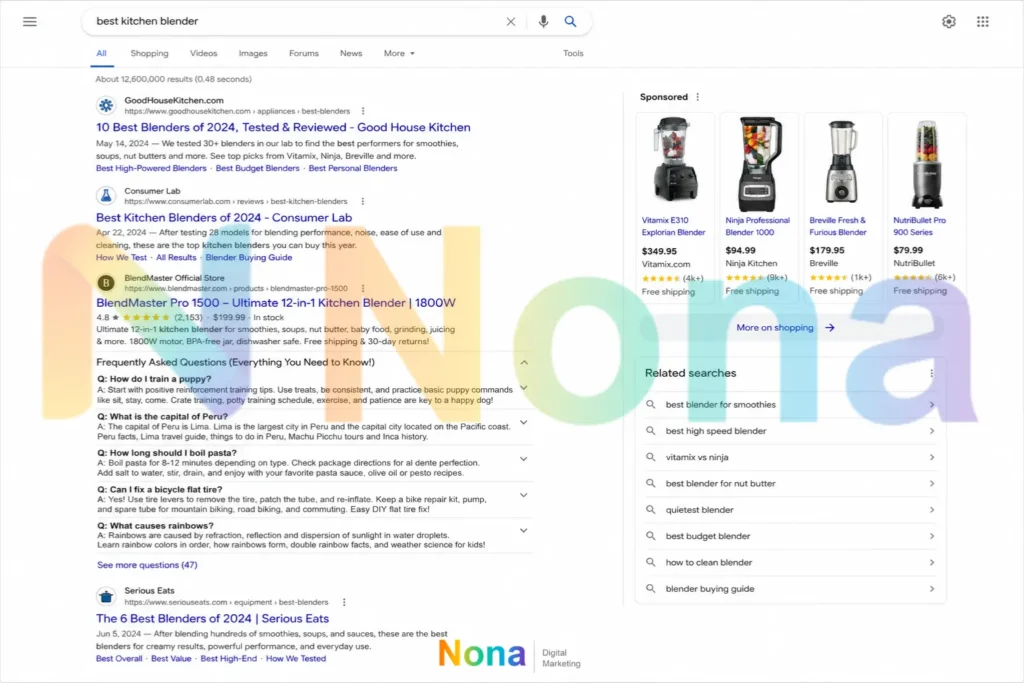
Then came the flood. Let’s take a quick look at the sample below.

Example of FAQ schema abuse in Google search results
A cluttered search results page for “best kitchen blender” showing a product result with an expanded FAQ section filled with irrelevant questions about puppies, Peru, pasta, bicycles, and rainbows, illustrating obvious FAQ schema abuse

A product result for “BlendMaster Pro 1500, Ultimate 12-in-1 Kitchen Blender” is displaying an expanded FAQ rich result, but the FAQ questions are mostly unrelated to the product or the search query “best kitchen blender.”
Examples of the abusive Q&As:

“How do I train a puppy?”

“What is the capital of Peru?”

“How long should I boil pasta?”

“Can I fix a bicycle flat tire?”

“What causes rainbows?”

These FAQs are irrelevant to a kitchen blender product page. They appear to be stuffed under the result to take up more SERP space, attract clicks from unrelated searches, and manipulate visibility.
A legitimate FAQ section for that product would include questions like:

“Is the blender dishwasher safe?”

“Can it crush ice?”

“What is the jar capacity?”

“Does it come with a warranty?”

“Can it make nut butter?”

So the abuse is: using structured FAQ markup to inject unrelated, keyword-stuffed Q&As into search results for a product page.

Within months, sites of every shape and size started stuffing artificial FAQ sections into pages where they had no business being. A plumbing company’s homepage suddenly had twelve “frequently asked questions.” A product page for running shoes somehow answered questions about marathon training. Low-effort, copy-paste Q&A content multiplied across the web, not because users needed it, but because it grabbed more pixels on the SERP.

Google eventually drew the line in August 2023, restricting FAQ rich results to authoritative government and health websites only. That move cut off most of the abuse, but the feature had already lost credibility. May 2026 simply marks the final chapter: a complete, permanent shutdown for every category of website.

The message from Google is clear, if a feature gets gamed at scale, it gets removed at scale.

What’s the real impact for content creators?

For creators who played by the rules and used FAQ schema genuinely, this stings. A well-executed FAQ listing could dominate a search result, pushing competitors below the fold and answering objections before a user ever landed on the page. That visibility boost is now gone.

Here’s what to expect in the weeks ahead:

  • Lower CTR on FAQ-heavy pages. If your listing previously showed expandable answers, your result now looks like everyone else’s. Same ranking, smaller footprint.
  • Drop in impressions. Pages that relied on FAQ dropdowns to attract curiosity clicks may see traffic dip even if their position holds steady.
  • Broken dashboards. If you or your agency built Search Console reports pulling FAQ rich result data, those integrations will break in August 2026 when the API support is retired.

The creators most at risk are those who optimized for the feature rather than for the user, pages built around schema tricks rather than genuinely useful content. For them, this isn’t just a UI change; it’s an exposure of a strategy that was always on borrowed time.

What Happens to Your Structured Data?

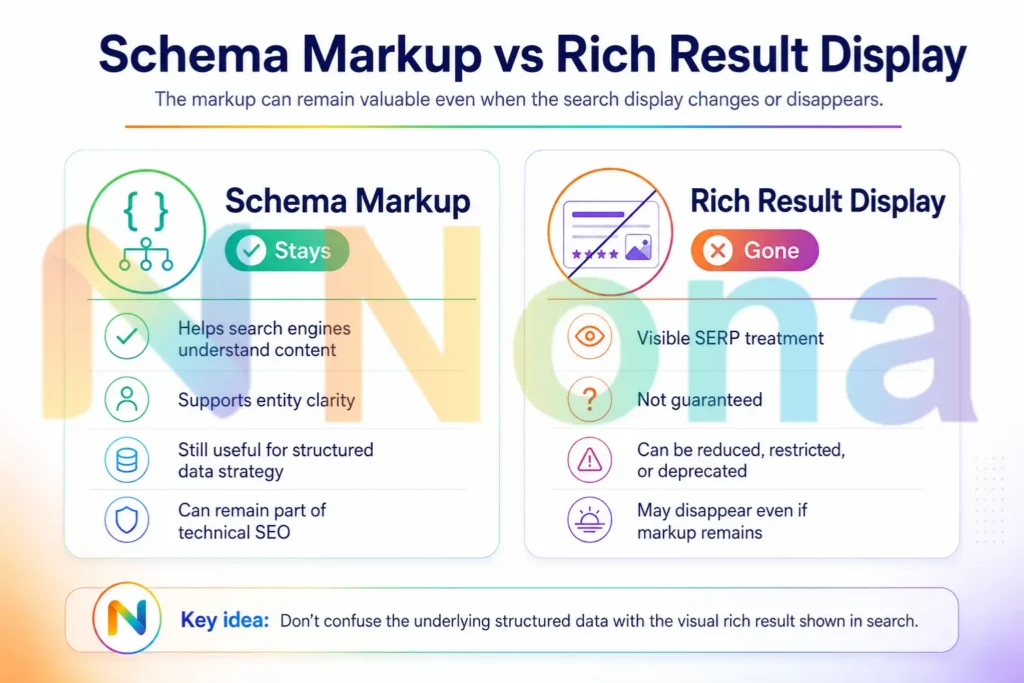
Here’s the nuance most coverage is missing: FAQ schema and FAQ rich results are not the same thing.

Google has ended the display feature. It has not dismissed the structured data itself.

In fact, Google’s own deprecation notice quietly confirmed that it will continue to use FAQPage structured data to better understand pages, just without surfacing the visual dropdown. That’s a meaningful distinction. Schema markup has always been a way of speaking to machines in their language, telling search systems what a piece of content is, who it’s for, and why it’s relevant. That function doesn’t disappear because a SERP decoration was retired.

Comparison of schema markup and rich result display in Google search

The practical takeaway: don’t rush to strip FAQ schema from your site. If your Q&A content is real, visible on the page, and genuinely answers user questions, the markup still earns its place. Other search engines may also continue to use it. And as AI-powered search grows, clearly structured content that AI systems can parse and cite becomes more valuable, not less.

Where to focus your SEO strategy now

The retirement of FAQ rich results is part of a longer arc. Google has been quietly simplifying the traditional SERP for years: HowTo rich results were deprecated in 2023, review schema has been restricted, and sitelink appearances have been reduced on mobile. The direction of travel is unmistakable, Google is building for AI-first search, not pixel-first search. Because SEO has never been just about keywords, and Google’s been signaling that for years

That means the content strategies that win going forward look different:

SEO priorities after FAQ rich results were removed

Helpful content over schema tricks. Google’s Helpful Content system rewards pages written for people, not for search features. Clear, honest, substantive answers that actually resolve a user’s question, that’s the new currency. If you’re using AI to produce that content, doing it the right way matters more than ever.

Entity clarity and topical authority. Structured data that helps Google understand what your site is about and who you serve matters more than structured data that inflates your listing size. Article schema, LocalBusiness schema, Product schema, and HowTo schema (where genuinely applicable) all remain valid.

AI citation readiness. As AI Overviews and other generative search features expand, the pages being cited are the ones that are authoritative, well-structured, and easy for machines to interpret.

If your FAQ content is strong, keep it, and mark it up properly. Being the source an AI cites is worth more than an expandable dropdown ever was. Learn how H2 and H3 headings directly influence whether your content gets cited by AI systems.

How to prepare for the FAQ rich results change

The window to act is short. Here’s a practical checklist:

  1. Export your FAQ rich result data from Search Console now, before the reporting disappears in June 2026.
  2. Audit pages that previously showed FAQ dropdowns and compare CTR before and after May 7. Know what you lost.
  3. Don’t do a mass schema purge. Review FAQ markup page by page. Keep it where the content is real and visible. Remove it only where the schema was decorative or misleading.
  4. Update API integrations that pull FAQ data from Search Console before August 2026, or they’ll break silently.
  5. Reinvest in content depth. Pages that earned FAQ visibility because they genuinely answered questions are still strong pages. Strengthen them further: better introductions, clearer structure, more specific answers.
  6. Diversify your schema strategy. HowTo, Article, Product, and Event schema still trigger rich results. Use them where they’re accurate and useful.

The bottom line

Google didn’t kill FAQ rich results because FAQ content is bad. It killed them because the feature was too easy to exploit and too hard to police. That’s a pattern worth remembering every time a new structured data opportunity appears.

The creators who will come out ahead aren’t the ones who react fastest to the loss. They’re the ones who already understood that no SERP feature lasts forever, and built their content to be worth reading long after the decorations disappear. That’s a perfect evergreen content moment, link naturally on “worth reading long after” or add: “That’s the definition of evergreen content, and it’s your strongest SEO asset right now.”

Write for people first. Structure for machines second. And never build your traffic strategy on a feature Google can switch off overnight.

Navigating changes like this is exactly what we do at Nona Marketing Digital. From SEO strategy and content creation to paid ads and full-service digital marketing, we help brands stay ahead of every algorithm shift, not just react to them. If Google’s latest move has you rethinking your strategy, let’s talk about our SEO services.

SEO Services

Looking to grow your business with SEO?

Get a strategy tailored to your business and start generating consistent traffic..

Guilherme Luiz Ferreira, Founder of Nona Digital Marketing

Written by

Guilherme Luiz Ferreira

Founder of Nona Digital Marketing, helping Orlando service-based businesses grow through SEO, Local SEO, PPC, web design, analytics, and practical digital marketing strategies.