
AI is starting to change how people interact with websites, but a lot of the discussion around it still feels abstract. One practical area worth watching is how well websites can be understood and used by AI agents.
The Agentic Browsing audit in Chrome 146 gives SEOs, developers, and website owners a new way to test how ready their websites are for AI agents.
Chrome Lighthouse may now be moving in that direction with experimental checks related to agent-friendly browsing. Instead of only looking at traditional performance, accessibility, SEO, and best practices, these checks focus on whether a website is structured clearly enough for automated agents to read, navigate, and interact with.
That matters because AI assistants do not browse websites the same way people do. They rely heavily on clean HTML, accessible labels, predictable layouts, and machine-readable signals. If your site is difficult for assistive technologies or automated tools to understand, it may also be harder for AI agents to use reliably.
This does not mean every site needs to rush into a full “AI agent optimization” project. A lot of this is still early and experimental. But it does give site owners and developers a useful reason to revisit fundamentals: accessibility, layout stability, semantic HTML, and clear site structure.
In this guide, we’ll look at what the Agentic Browsing audit in Chrome 146 is intended to check, why it overlaps with technical SEO, and which fixes are actually worth prioritizing right now.
Table of Contents
Table of Contents
What is the Agentic Browsing audit in Chrome 146?
The Agentic Browsing audit in Chrome 146 is an experimental Lighthouse category focused on how well a website supports AI agent interaction.
Chrome Lighthouse is already widely used by developers and SEO professionals to test performance, accessibility, best practices, and SEO. With this newer audit category, Lighthouse adds another layer: agent readiness.
The Agentic Browsing audit appears to be a newer experimental category focused on a different question: can an AI agent understand and use your website?
That includes basic but important things like:
| Audit Area | What It Looks At | Why It Matters |
|---|---|---|
| Accessibility labels | Buttons, links, menus, and form fields with clear names and roles | Helps both screen readers and AI agents understand what each element does |
| Layout stability | Whether page elements move while the page loads | Reduces frustration for users and makes automated interaction more reliable |
| Semantic HTML | Proper use of headings, buttons, forms, navigation, and page structure | Makes the content easier for search engines and AI systems to interpret |
| llms.txt | A machine-readable file that can summarize important site information | Gives AI systems a clearer starting point, although it is still optional |
| WebMCP | Early support for structured agent interaction with websites | Experimental now, but worth monitoring as AI browsing develops |
An AI agent does not experience a website the way a human does. A person can visually scan a page, understand context from design, ignore small layout shifts, and guess what a button does based on surrounding content. An agent depends much more heavily on clean page structure, accessible labels, predictable layouts, and machine-readable information.
That means common technical issues can become bigger problems for agent-based browsing. For example, a button with no accessible name may still be understandable to a human because of visual context, but it may be unclear to an AI agent. A form field without a proper label may still look obvious on screen, but programmatically it can be difficult to interpret. A layout that shifts after loading can also make automated interaction less reliable.
According to Chrome’s documentation, the Agentic Browsing category is experimental and based on proposed standards. It does not work like the traditional Lighthouse Performance score, where everything is rolled into a weighted 0–100 number. Instead, it shows readiness checks and pass/fail signals related to machine interaction.
Before running the Agentic Browsing audit in Chrome 146, make sure your browser is updated and the experimental WebMCP flag is enabled.
For official technical details, you can review the Chrome 146 release notes.
Why the Agentic Browsing audit matters for SEO
At first, agentic browsing may sound like something only developers need to care about. But it has a clear connection to SEO.
Search engines have always rewarded websites that are easier to crawl, understand, and use. AI agents have similar needs. They need content that is easy to interpret, actions that are clearly defined, and pages that do not break when interacted with programmatically.
The overlap with technical SEO is strong. Accessibility, semantic HTML, layout stability, internal linking, and clear content structure all matter for both search engines and AI systems. A website that is messy for users is often messy for crawlers. A website that is messy for crawlers will likely be messy for agents too.
This is why the Agentic Browsing audit should not be treated as a separate “AI SEO trick.” It is more useful to see it as another layer of technical quality control.
If your website already has strong accessibility, stable layouts, well-labeled buttons, clean navigation, and crawlable content, you are probably closer to agent-friendly browsing than you think. If your site relies heavily on confusing JavaScript interactions, vague button labels, missing form descriptions, or unstable page elements, this audit may expose issues that were already hurting users.
There is also a visibility angle. As AI search tools and assistants become more common, websites that are easier for machines to understand may have an advantage in how their information is extracted, summarized, or acted upon. That does not mean the Agentic Browsing audit is a direct ranking factor. There is no reason to treat it that way right now. But it does highlight technical areas that already matter and are likely to matter more in the future.
This also connects with the broader shift toward AI search optimization. If you want to understand how SEO is changing around AI-generated answers, GEO, and AEO, read our guide on GEO, AEO and SEO for AI.
What the Agentic Browsing audit checks
The current Agentic Browsing audit focuses on a few practical areas. Some are already familiar to SEOs and developers. Others are newer and more experimental.
One area is accessibility. AI agents often rely on the accessibility tree to understand what is available on a page. If interactive elements do not have proper labels, roles, or names, the page becomes harder to navigate programmatically. This is another reason accessibility should not be treated as a side task. It directly affects how machines understand your website.
Another area is layout stability, especially Cumulative Layout Shift, also known as CLS. If a button or form field moves after the page loads, an agent may identify the element in one position and then fail to interact with it correctly after the layout changes. The same problem frustrates human users, especially on mobile devices.
The audit may also check for llms.txt, an emerging convention designed to give AI systems a concise, machine-readable summary of a website’s content. This file usually lives at the root of a domain, similar to how robots.txt does. However, it is important not to overstate its impact. Chrome’s Lighthouse documentation treats llms.txt as optional at the moment, not as a guaranteed AI visibility booster.
Then there is WebMCP, which is still early. WebMCP is related to giving AI agents a more structured way to understand and interact with website functionality. For most websites, this will not be something to fully implement immediately. It is worth monitoring, but accessibility, stable layouts, and clear HTML are more practical priorities today.
Sitemaps still matter in this bigger picture. A clean XML sitemap helps search engines discover and prioritize important pages, and it supports a healthier technical SEO foundation. For more details, read this guide on sitemap XML best practices.
How to use Chrome 146 to run the Agentic Browsing audit
Here is a practical tutorial you can follow to test your website.
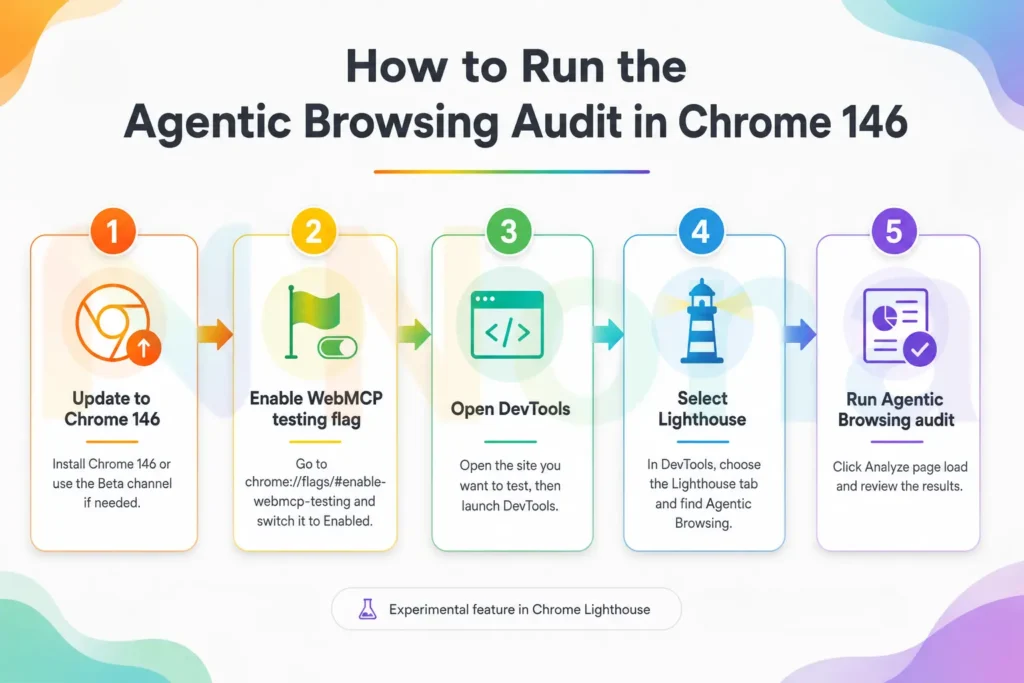
First, check your current Chrome version. Open Chrome, click the three-dot menu in the top-right corner, go to Help, then click About Google Chrome. You can also type this directly into your browser:
chrome://settings/help
Chrome will show your current version and automatically check for updates. If Chrome 146 is available for your system, install the update and relaunch the browser.
If Chrome 146 is not available in your stable browser yet, you may need to use Chrome Beta or another Chrome release channel where the feature is available. Since this is an experimental area, availability can vary depending on your browser version and setup.
Once Chrome 146 is installed, open a new tab and go to:
chrome://flags/#enable-webmcp-testing
This should take you directly to the WebMCP testing flag. Change the setting from Default to Enabled. Chrome will ask you to relaunch the browser. Relaunch it before continuing, because the flag will not take effect until the browser restarts.
After Chrome reopens, go to the website page you want to test. It is a good idea to start with an important page, such as your homepage, a service page, a product page, or a lead-generation landing page.
Now open Chrome DevTools. On Windows or Linux, press F12 or Ctrl + Shift + I. On Mac, press Command + Option + I. You can also right-click anywhere on the page and select Inspect.
Inside DevTools, look for the Lighthouse tab. If you do not see it immediately, click the double-arrow icon to reveal hidden tabs. Once you are in Lighthouse, look at the list of audit categories. If the experimental setup is working, you should see Agentic Browsing as an available category.
Select the Agentic Browsing category. You can run it by itself, or you can keep the other Lighthouse categories selected if you want a broader technical report. Then click Analyze page load.
Lighthouse will reload the page and generate a report. When the report is ready, review the Agentic Browsing section carefully. Instead of looking only for a perfect score, pay attention to what the audit is actually telling you.
If the report flags accessibility issues, start there. Fix missing labels, unclear buttons, incorrect ARIA attributes, and form fields that do not have proper names. If it flags layout stability, check images, ads, embeds, fonts, banners, and any content that loads late and pushes the page around.
If the report mentions llms.txt, decide whether adding one makes sense for your website. A basic file can summarize your business, main content areas, and important URLs in a clean Markdown format. Do not treat it as magic, but it can be a useful machine-readable signal.
If the report flags WebMCP-related items, document the result and monitor the standard as it develops. For many businesses, this will be something to revisit later rather than an urgent fix today.
What website owners should fix first
The best way to approach this audit is to separate practical improvements from experimental ones.
| Priority | What to Fix | Recommended Action |
|---|---|---|
| High | Missing accessibility labels | Add clear labels to buttons, links, icons, and form fields |
| High | Layout shifts | Define image dimensions, control font loading, and avoid late-loading banners |
| Medium | Weak page structure | Use semantic HTML for headings, navigation, buttons, and forms |
| Medium | Poor internal linking | Make sure important pages are easy to reach from other relevant pages |
| Low / Experimental | llms.txt | Add a simple file if you want to provide AI systems with extra context |
| Monitor | WebMCP | Keep an eye on the standard before investing heavy development time |
Start with accessibility. Every important button should have a clear name. Every form field should have a proper label. Navigation should be understandable. Headings should follow a logical structure. Links should describe where they go instead of using vague text like “click here.”
Next, work on layout stability. Add width and height attributes to images where appropriate. Avoid injecting large banners above existing content after the page loads. Make sure fonts do not cause major shifts. Be careful with ads, popups, and third-party scripts that move important elements.
Then review your page structure. Use semantic HTML whenever possible. A real button should be a button, not a styled div. A navigation menu should be marked up clearly. A form should be structured in a way that both users and machines can understand.
After that, look at discoverability. Make sure your sitemap is clean, your internal links are logical, and your most important pages are not buried too deeply. If you decide to add llms.txt, keep it concise and useful. Do not stuff it with marketing language. Think of it as a short guide that helps a machine understand what your site is about.
Finally, keep an eye on WebMCP. It may become more important as browser-based AI agents mature, but it is still early. For now, most businesses will get more value from fixing accessibility, stability, and technical SEO basics.
Agentic Browsing is an early signal, not an SEO shortcut
The Agentic Browsing audit is not something to fear. It is also not something to blindly chase as the next big SEO hack. The Agentic Browsing audit in Chrome 146 should be treated as an early signal, not a replacement for traditional technical SEO.
The smarter approach is to treat it as an early warning system. It shows where the web is moving and reminds us that clean, accessible, stable websites are easier for everyone to use, people, search engines, assistive technologies, and AI agents.
For now, the most practical wins are clear: improve accessibility, reduce layout shifts, use semantic HTML, maintain a clean sitemap, and keep your technical SEO foundation strong. Those improvements help your website today, even if agentic browsing standards continue to change tomorrow.
And if you need help preparing your website for the next stage of search, Nona Digital Marketing helps companies leverage SEO and build stronger visibility online.
Need help fixing accessibility, indexing, sitemap, or technical SEO issues?
Improve your website’s visibility with technical SEO services built for search engines, users, and the next generation of AI-assisted browsing.